A clear, accurate read on your fleet's health —
improving with every charter.
As a Base Manager, CharterWise Fleet shows you exactly where every boat stands today, verified at every handover — not projected from a maintenance log. See what's improving, what needs attention, and make sure the next charterer steps onto a better boat than the last one did.
The problem
You want your fleet to keep getting better.
You can't tell if it actually is.
A boat comes back at 10am. Another guest is due at 5pm. As a Base Manager, your job is to keep every boat in better shape than the charter before — but your team walks it with a paper clipboard: no photos worth keeping, no timestamp, no record beyond a signature. If a fender's missing or the watermaker's dead, it's a phone call and a guess. Multiply that across every base, every Saturday.
Three weeks later, when a deposit dispute lands or the same issue turns up on a different boat, there's nothing to point back to — and no way to tell whether your fleet's overall condition is actually trending up or down.
CharterWise Fleet replaces the clipboard with a digital handover that captures verified condition data as it happens — so you always have an accurate, current read on every boat, and can see what's improving before the next charter starts.
Real, verified condition data on every boat you run — captured handover to handover, so you always know exactly where your fleet stands.
How it works
Fleet operations, finally in one system.
Set up your fleet & team
Add every boat you run, then invite your team with the right access — Admin, Base Manager, Skipper, Billing, or Vessel Owner. Each role sees exactly what it needs to.
Guests check in — digitally, signed
At handover, guests walk through 5 systems, flag issues with photos, and sign off electronically — no app download required. A branded PDF report is generated as it happens.
Issues surface, your team acts
Recurring issues surface in your fleet's condition score, and clear when the next guest confirms a fix held. You always know whether things are trending up before the next charter starts.
Features
Everything your fleet operation runs on.
Condition Dashboard
Your whole fleet, always visible.
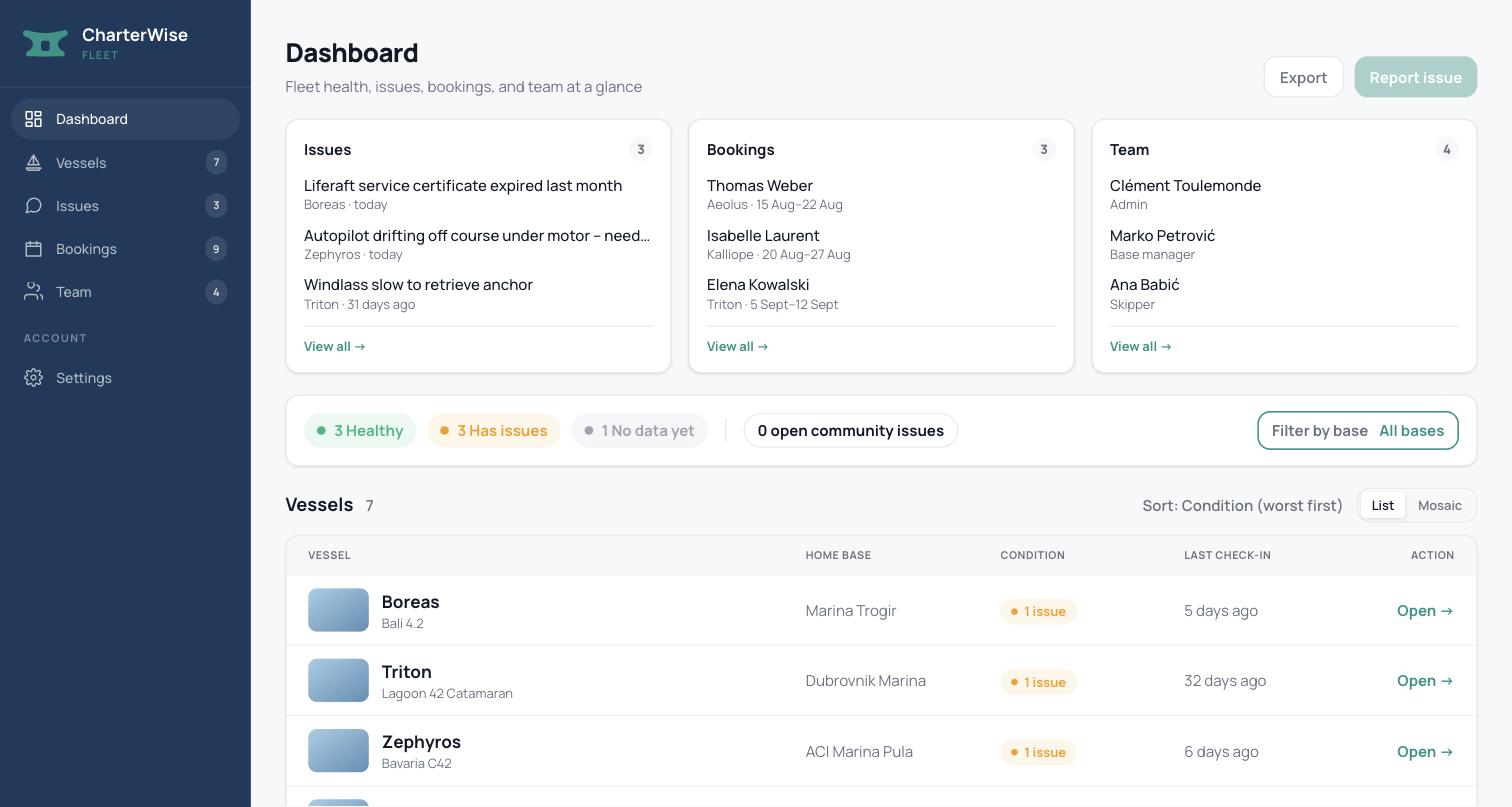
A live condition score for every boat you run, built from real handover and check-in reports — entered once, by whoever's actually there (guest, skipper, or base manager), never re-compiled by your team afterward. Sorted worst-first, so you see what needs attention without hunting for it.
This is what a charter company logs into today — not a mockup.
Vessel Management
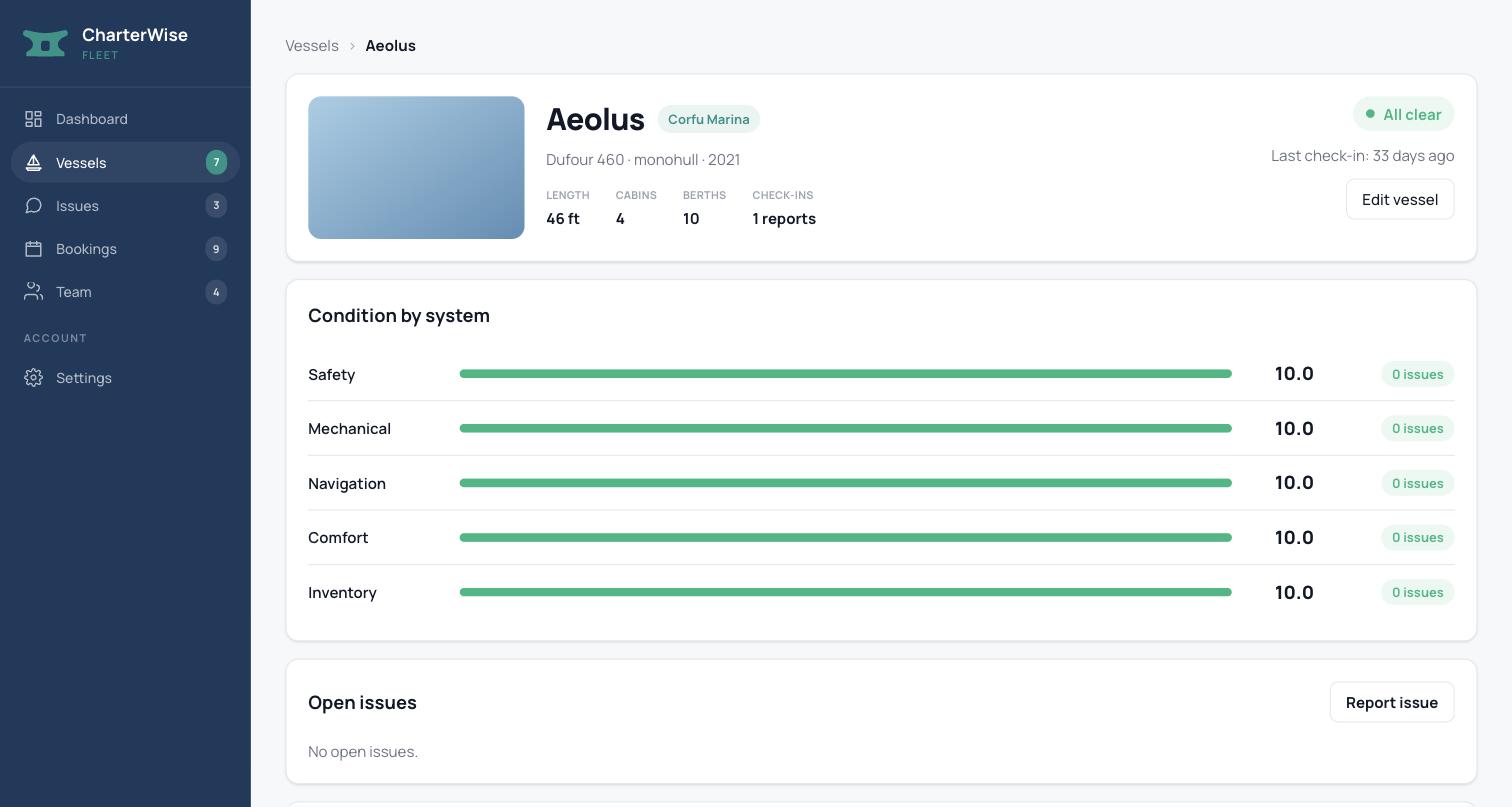
Every boat, scored system by system.
Open issues broken down by Safety, Mechanical, Navigation, Comfort, and Inventory, tracked straight back to the handover that found them — no paper clipboard, no guesswork. When an issue is flagged, it resurfaces at the next check-in, so you always know if a fix actually held, boat by boat.
Digital Handover
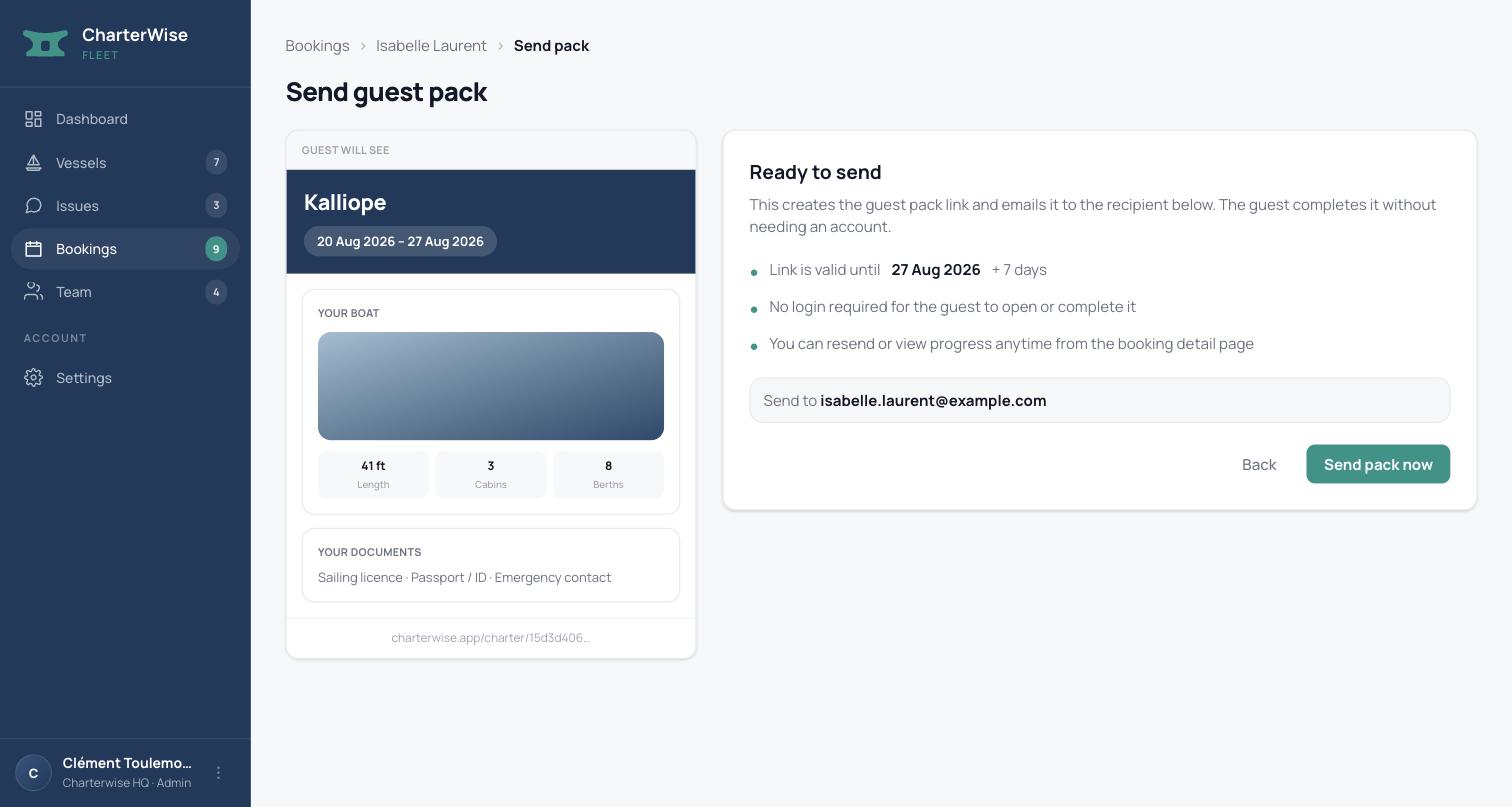
The handover moment, signed and stored.
One click sends the branded pre-charter pack straight from a booking. Guests review the boat and sign off through a no-login web link — no app to install, just whatever device they already have in hand. A branded PDF handover report is generated and stored as it happens, and any deposit is tracked against it from pickup to return. It's often the first professional impression a guest has of your operation — before they've even stepped onto the boat.
Team & Multi-Base
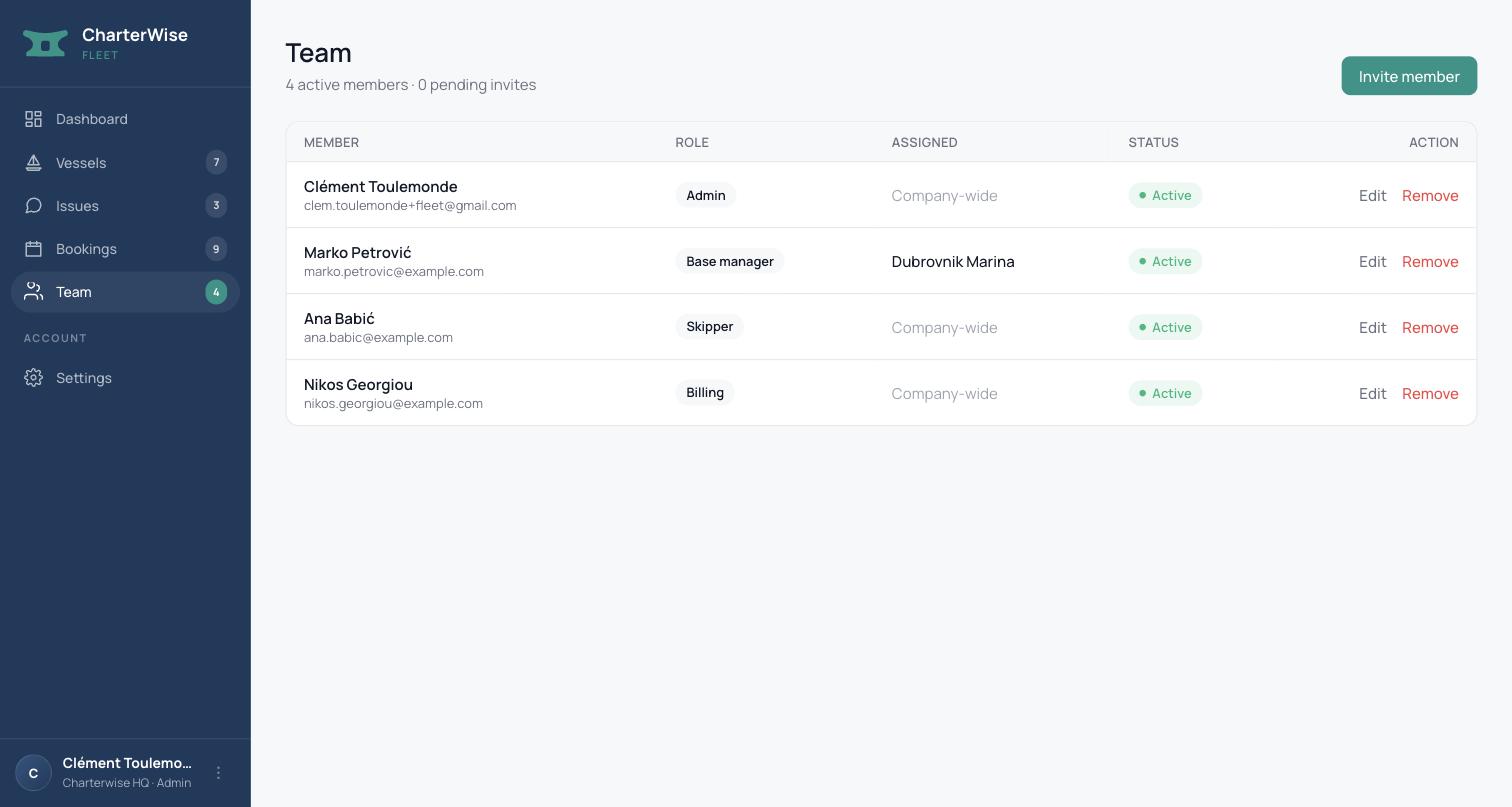
The right access, for every role.
Invite your team with scoped roles — Admin, Base Manager, Skipper, Billing, or Vessel Owner. A Base Manager only ever sees their own base's boats and staff; a Skipper only sees their assigned vessel. A real permission structure, not a flat user list.
Issues Queue
Fixed in time for whoever's next.
Every issue — flagged by your own staff, caught during a handover checklist, or reported by a guest through the CharterWise app — lands in one fleet-wide queue, prioritized by each boat's next confirmed charter, not who filed first or shouted loudest. Assign a fix to a specific team member or filter by assignee, or let staff self-claim it straight from the list. Every item tracks its own progress — Open, Planned, In Progress, Fixed — and can be reopened if a guest reports the same issue again, so nothing quietly falls through the cracks.
Issues · sorted by next charter
Inishmore · Sails & Rigging
Lines are worn out
Next charter: tomorrow
Aurora · Engine & Electrics
Intermittent alarm on start
Next charter: in 12 days
Fleet Mobile
Built for the dock, not the office.
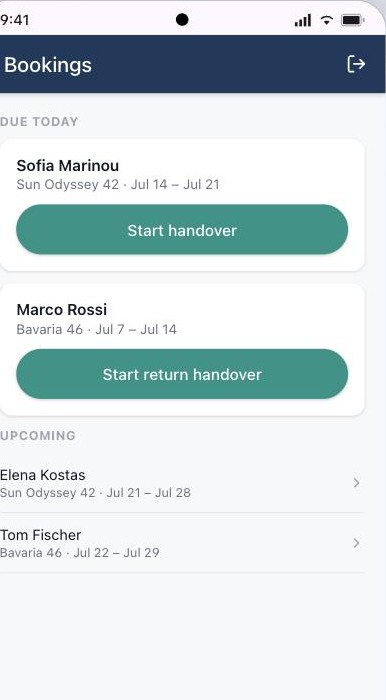
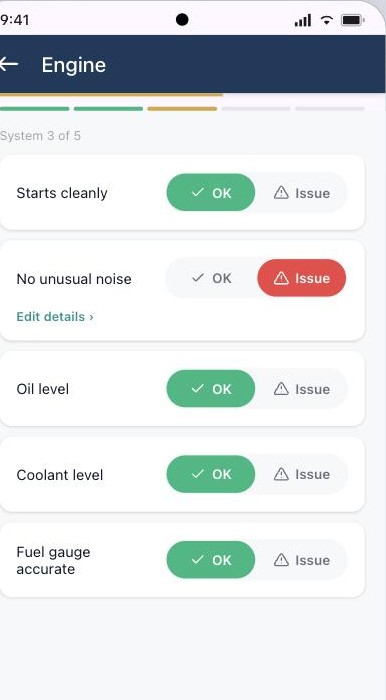
A dedicated Android app for your skippers and base managers. Bookings Home surfaces what's due today and sets pickup or return mode automatically — no scrolling a shared calendar between boats. From there, one reusable checklist screen per system (Safety, Rigging, Engine, Hull, Comfort) reduces every check to a clear OK or Issue, so "probably fine" never leaves the dock as an answer.
Safety Inventory
Every safety item, logged once a season.
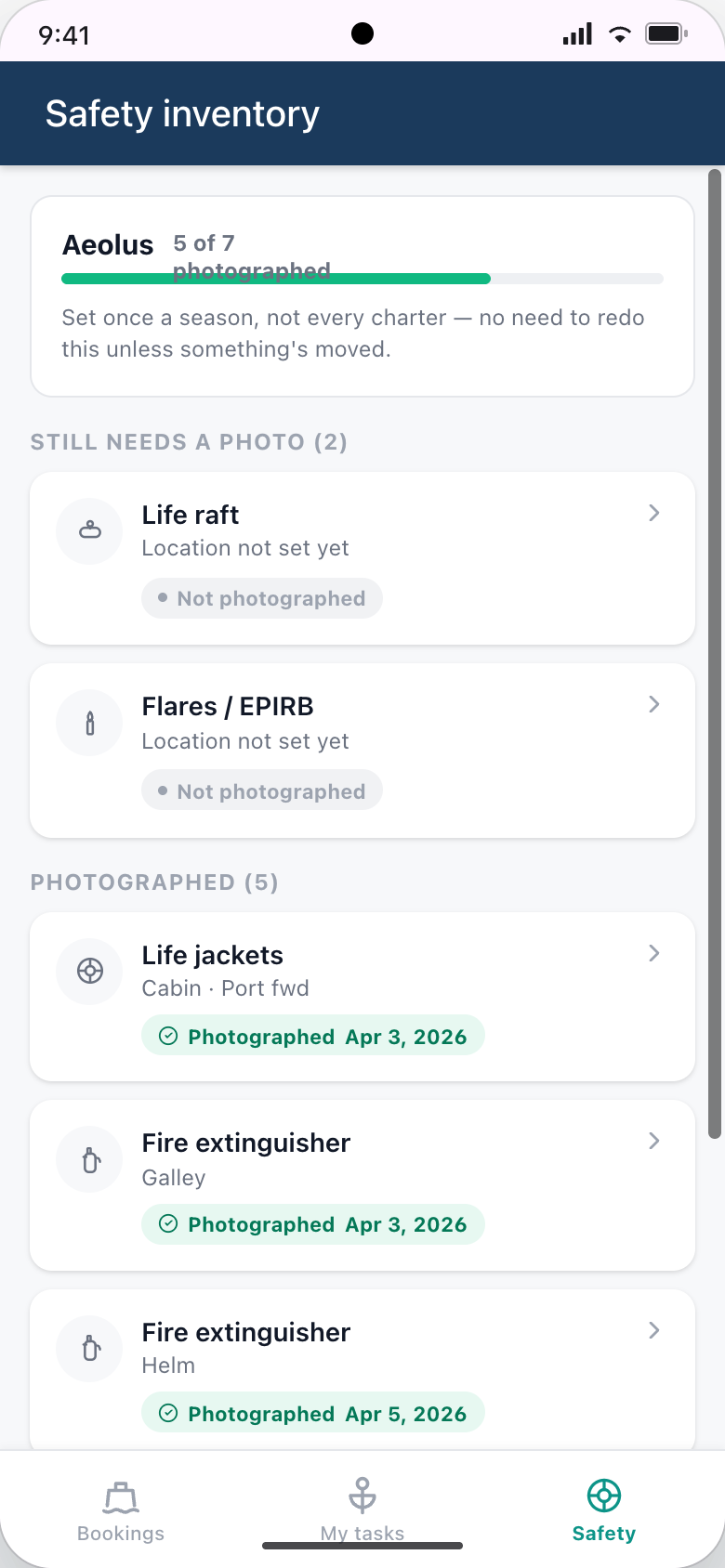
Set once at the start of the season: staff photograph and locate each safety-critical item on the boat — life jackets, extinguishers, life raft, flares, EPIRB, first aid kit — with a location, a photo, and an optional expiry date. Every handover after that is a 30-second check against the list instead of a locker hunt, and expiry tracking catches an out-of-date life jacket or flare before a guest, or an inspector, finds it first.
Sign, Send, Done
Closed out on the dock, without waiting on the guest.
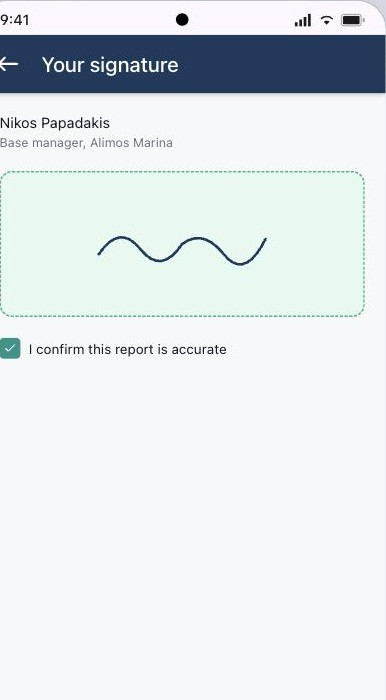
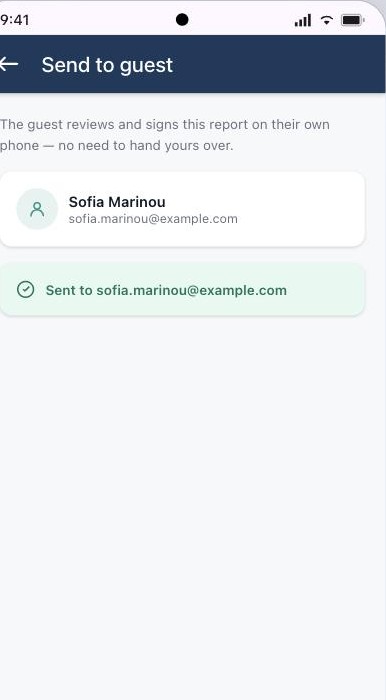
Your base manager confirms and signs off on the dock — their own record that the report is accurate, captured before the boat ever leaves. Send to Guest queues the rest instantly, even offline, so the guest signs on their own phone whenever they're ready. Your team never stands around waiting for a signature: send it, move to the next boat.
The web dashboard
This is what your team logs into.
The same fleet data your office runs the business on — no separate system to keep in sync.
Ready for a clear, accurate read on your fleet?
Tell us a bit about your fleet — we'll get back to you directly.
Thanks — got it.
We'll be in touch soon to talk through your fleet.
FAQ
Common questions
What does setup look like for my fleet? ▾
We onboard your fleet together — typically one short call. We add your boats and team to the system, and from that point every handover runs through it, no extra setup per booking. No integration or technical setup required on your side.
How does my fleet data stay private? ▾
Your Fleet dashboard is private to your company — access is scoped by role, so a Base Manager only sees their own base and a Skipper only sees their assigned vessel. Condition data captured at handover, and reviews submitted by guests, are visible to future charterers of your boats and to you; none of it is searchable by competitors or the general public beyond what a booked guest can see.
Can my team respond to reported issues? ▾
Yes. Every issue — staff-filed, caught at handover, or reported by a guest through the app — lands in one Issues Queue on your dashboard, prioritized automatically by each boat's next confirmed charter. Assign it to a team member or let staff self-claim it, track it through Open, Planned, and In Progress, and it's marked Fixed once resolved — with the option to reopen if it comes back.
Do my skippers need to download anything? ▾
For handovers today, no — the Fleet web dashboard runs on any device, no install required. Fleet Mobile, a dedicated Android app for on-the-dock staff (bookings, checklists, signatures, safety inventory — even offline), is rolling out to fleets next.
What does it cost? ▾
We work directly with each fleet at this stage rather than publishing a self-serve plan — reach out and we'll figure out the right setup together.
Why did you create CharterWise? ▾
I've chartered many boats across the Mediterranean, Caribbean, and beyond. Every time, I arrived without context about the boat's true condition. I built CharterWise to capture the handover moment — and realised the data is just as valuable to the company running the fleet as it is to the sailor stepping aboard.